How to Format a Book Manuscript: A Complete Guide
Contents
What is a manuscript?
A manuscript is a hand-written or typed draft of a writer’s work. This should not be confused with a layout, which refers to designed pages, or a book, which refers to a printed and bound product. The manuscript stage exists before the words are designed and laid out. This is the document that a writer delivers to a literary agent, editor, or book designer.
Why does manuscript formatting matter?
When presenting yourself and your work to a potential literary agent or edit, it is important to come across as polished and professional. The same is true of your manuscript. Delivering a messy manuscript with inconsistent formatting, or manuscript formatting that deviates from the norm tells the reader that you have either not done your homework, or you simply don’t care. Beyond that, a poorly formatted manuscript can be challenging to read—and hard to read may easily transition to a manuscript being put down.
But even for authors who intend to self-publish a book, manuscript formatting is essential. By properly formatting a manuscript before giving it to a book designer, you minimize the possibility of mistakes creeping into the design. If a designer has to erase every double space or remove all the tabs in a book, chances are other things are going to disappear, too. Things that are meant to stay in the book. And a freelance editor who has to reformat a book will charge you for every minute they spend doing that, which can turn into a costly endeavor for a long book!
Whether you are preparing to send a manuscript to a literary agent or editor, or simply to send it to a book designer, do yourself a favor and learn the ins and outs of manuscript formatting.
How to format a book manuscript
- Paper size: Manuscripts should be written on 8.5" x 11" or A4 paper, depending on the country you live in. Make sure your manuscript adheres to these standards, and is set in portrait mode, rather than landscape.
- Margins: Your pages should include one-inch margins all around (top, bottom, and sides).These should be the default margins in your word processor, but double check that they are set correctly.
- Line spacing: All lines of a book should be double spaced, with no extra spaces between paragraphs. Double spaced text is not only easier to read, but it also gives an editor or a literary agent space to take notes as they read.
Pro Tip: It is not uncommon when starting a new document in word to have the spacing before an after a paragraph set to “auto.” Double check that your spacing is set to 0, as auto can result in unexpected spacing between paragraphs.
- Alignment: Books should be left-aligned, NOT JUSTIFIED! It is tempting as an author to deliver a manuscript with justified text, as it delivers clean lines down the left and right sides of the text block. But it also leads to awkward and distracting spaces between words. Get comfortable with the idea that the right side of the page will not be a straight line.
- Font: Manuscripts should be written in 12-point Times New Roman unless otherwise noted by an author or agent. Always make sure the text in the manuscript is set to true black, not a deep gray or blue.
- Indentation: The first line of a new paragraph should be indented by a half-inch. This should be accomplished by using the indentation feature on your word processor. Do not tab over to achieve and indentation, and do not hit the space bar to create an indent.
- Spacing after sentences: Sentences should be separated by a single space after a period. If you are in the habit of using two spaces after a period, do a find and replace before completing a manuscript to remedy this problem.
- Apostrophes and quotation marks: Manuscripts should use smart quotes. Smart quotes are apostrophes and quotation marks that curve inward, showing a clear distinction between opening quotes and closing quotes. Smart quotes look like the following: “ ”. Straight quotes, on the other hand, look like this: " ". These are intended to indicate measurement, not to be used as apostrophes or quotation marks within a document. A simple find and replace for apostrophes and quotation marks will usually update a document to smart quotes.
- Page numbers: Pages numbers should begin with number one on the first page of the story and appear continuously until the end of the book. Any pages that precede the story (such as a dedication, an introduction, a foreword, or a table of contents) should be numbered using roman numerals.
Pro Tip: Automate your page numbers so that they shift with your document as words are added and deleted. Doing so will also allow you to create an automatic table of contents that always lists the right page numbers.
- Page headers: With a printed manuscript, it is easy for pages to get lost, mixed up with another book, or even just end up out of order. Make it easy for anyone reading the book to keep the pages in order and where they belong by setting up page headers. These should include your last name, title, and the page number. For example: Vitale/SayCheese/7.
- Scene or section breaks: Scene breaks occur in a story when there is a dramatic shift in scene or a shift to a new character. To indicate a scene break, add a line between paragraphs with three hashtags (###) or three asterisks (***). These characters should be centered on the page, not left-aligned.
Pro Tip: It is also acceptable to identify a scene change by leaving a blank line between paragraphs and removing the indentation from the first paragraph of the new scene. If you follow this format, be sure to also remove the indentation from the first paragraph of each chapter for consistency.
- Ending: Always conclude your manuscript by typing “END” or “THE END” below the last line of the story. This should be capitalized and centered on the page. By adding this to a manuscript, you tell agents and editors that they have in fact received the full manuscript.
How to format chapters
New chapters should always begin on a new page. But DO NOT hit enter until you get to the new page. Doing so is a guaranteed way to cause problems as soon as something changes in the previous chapter. Instead, utilize page breaks to start a new page.
The chapter title should be centered a third to halfway down the page and should list the chapter number and/or chapter name. Not all books have chapter numbers and chapter names. Some books list only chapter numbers, some list only chapter names, and some use both. Any of these combinations is fine so long as it is done consistently.
Pro Tip: When numbering chapters, make sure to do so consistently. Check that all numbers are either spelled out or written as numerals. The two should not be mixed.
Pro Tip: Before submitting a manuscript, ensure that every chapter is accounted for. It is easy to jump from chapter 5 to chapter 7. Scroll through the book to make sure that each new chapter number is in order and none are missing or repeated.
How to format sections
Just as books can be broken into chapters, they can also be broken into parts or sections. This is especially true of fantasy books.
Format new parts as you would a new chapter by setting on a page of their own, with the part name and/or part number listed a third to halfway down the page.
How to create a title page
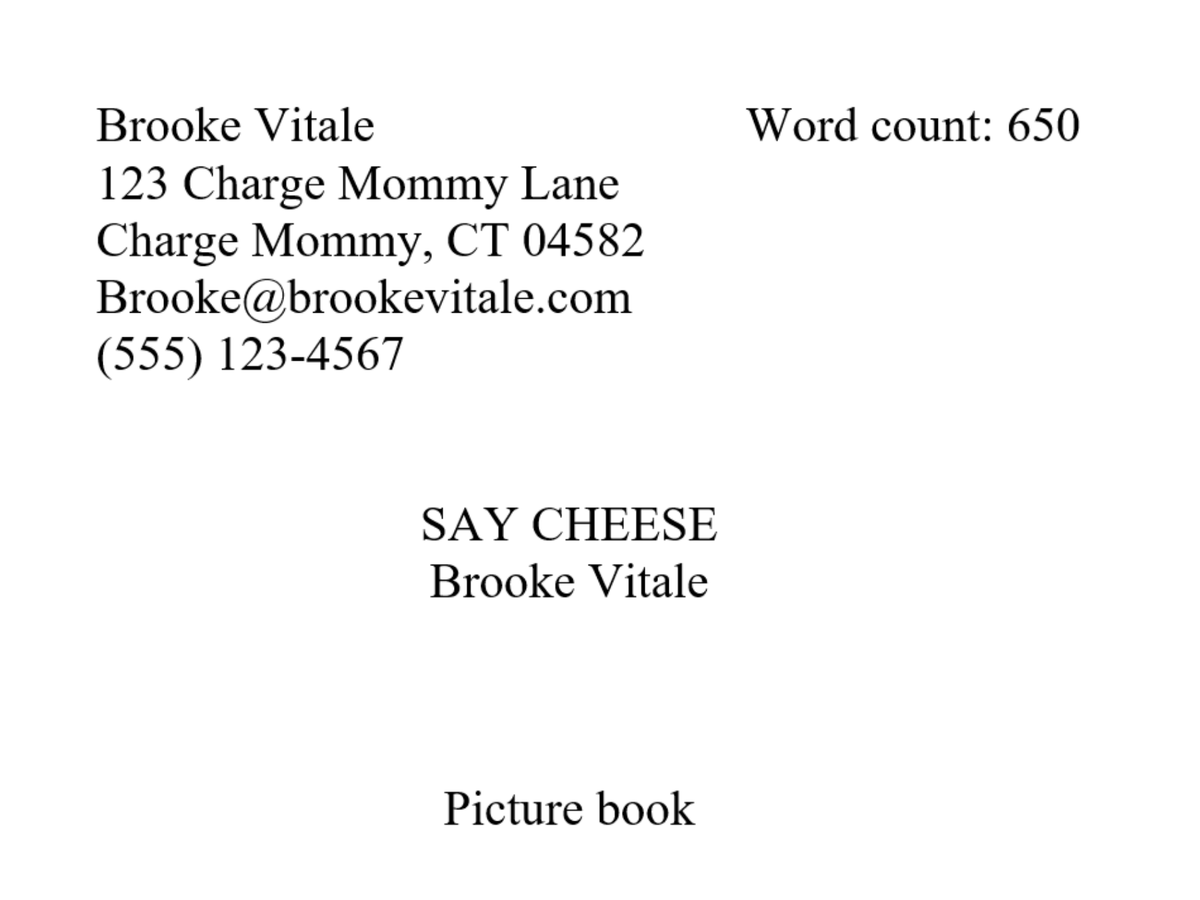
Whether submitting to agents, editors, or designers, a title page tells the person reading a manuscript who you are, what the book is, and how to get in contact with you. A manuscript’s title page consists of four elements: title and author name, contact information, and word count. The information on the title page should all appear in 12 point Times New Roman, black type.
- Title and author name: Center the title of the book halfway down the page. This should be written in all caps, not italicized. On the next line below the title, include the author’s name.
- Contact information: Include your name, address, phone number, and email address on the top left-hand corner of the title page. This information should be single-spaced, and should be left-aligned.
- Word Count: Word count should appear on the top right-hand corner of the title page. Exact word count is not necessary. Providing a round figure is sufficient.
Pro Tip: When querying agents, it is never a bad idea to identify the genre and/or age range for your book. This can be listed at the bottom of the title page, also centered. For example: Lower middle grade fantasy
How to name a manuscript file
When submitting a manuscript to a literary agent or publisher, it is essential to make the file as easy to find as possible within their records. Often an agent will remember who sent them a book, but not necessarily the name of the book. Make it easier on agents and editors by including your last name as the first element of the file name.
Common practice for naming is to list as follows:
- File Naming Convention: Lastname_TITLE_date.
- Set your last name with an initial cap, the title in full caps, and separate the elements by underscores.
Pro Tip: Never add spaces to a file name, as these can easily become garbled in translation and replaced by symbols such as %.