Proofreading Marks: What Are They and Why Do They Matter?
Contents
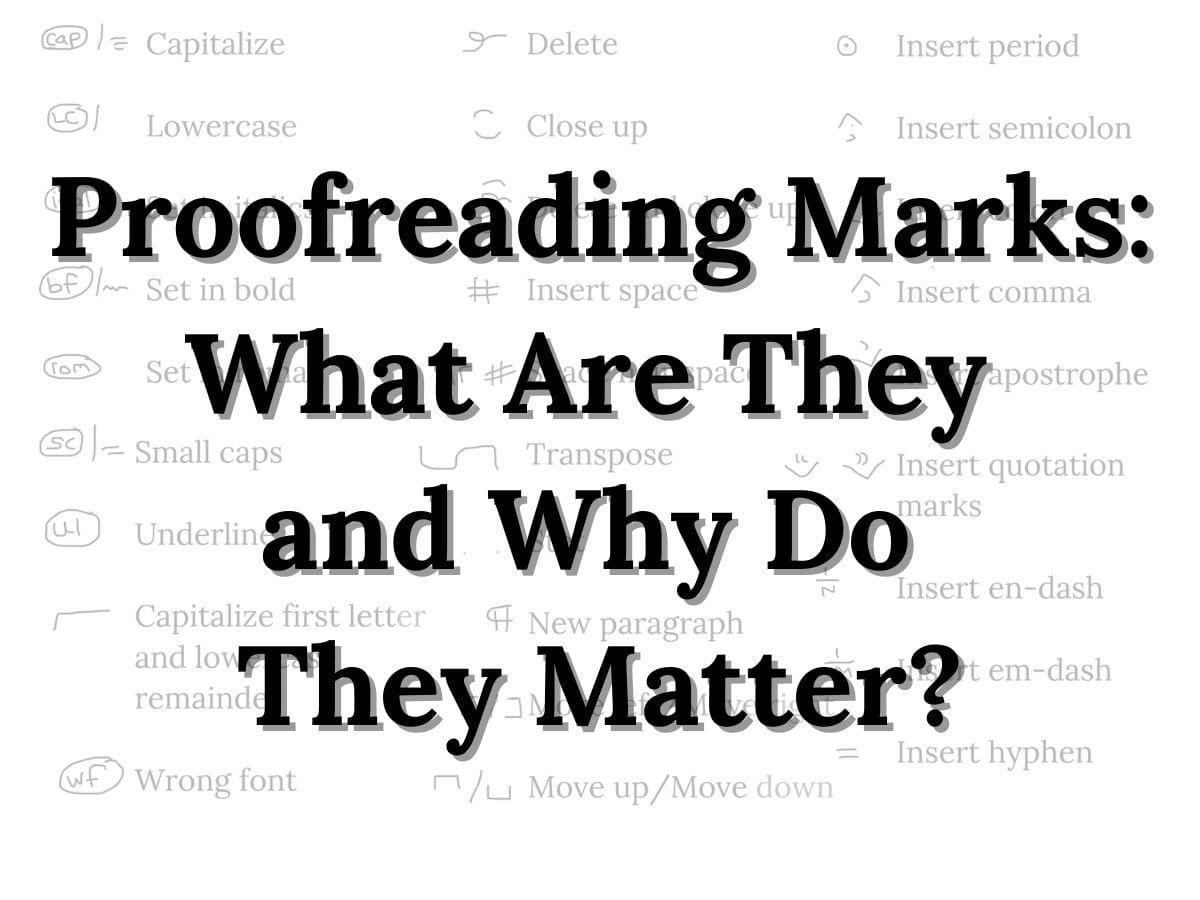
Proofreading Marks. To the untrained eye, they might just look like a bunch of squiggles. Even worse: a bunch of red squiggles that tell you your book is full of mysterious mistakes! But, to a well-seasoned editor, proofreading marks are a complex editorial language of symbols that take a final manuscript from good to polished. So what do they look like, and why do they matter? Let’s find out!
What are proofreading marks?
Proofreading marks are a set of symbols that editors use to point out punctuation, formatting, and typographical errors in a document. They are used both by copy editors on drafts of a manuscript and by proofreaders on laid-out book pages. They are reviewed by book editors across all drafts of a book. And they are implemented by book designers when making changes to the layout of a book.
 Related articleWhat Is Proofreading: the Most Misunderstood Editing ServiceProofreading is a review of designed book pages against a copy edited manuscript. A proofreader is looking primarily for formatting issues, but will also read for spelling and grammar mistakes. Proofreading is the last editorial step before a book goes to the printer.Read the article →
While to many authors, proofreading marks might look confusing or mysterious, to editors they are exactly the opposite: they are a clear, well-defined way of communicating about a book. Why? Because all editors, copy editors, proofreaders, and book designers use the EXACT SAME SET OF MARKS.
When a copy editor marks up a change, there is no wondering what is intended. A squiggly line under a word ALWAYS means to set that word in bold. Three lines under a word (or letter) ALWAYS means to capitalize. And a number sign (or hashtag) between two letters ALWAYS means to insert a space.
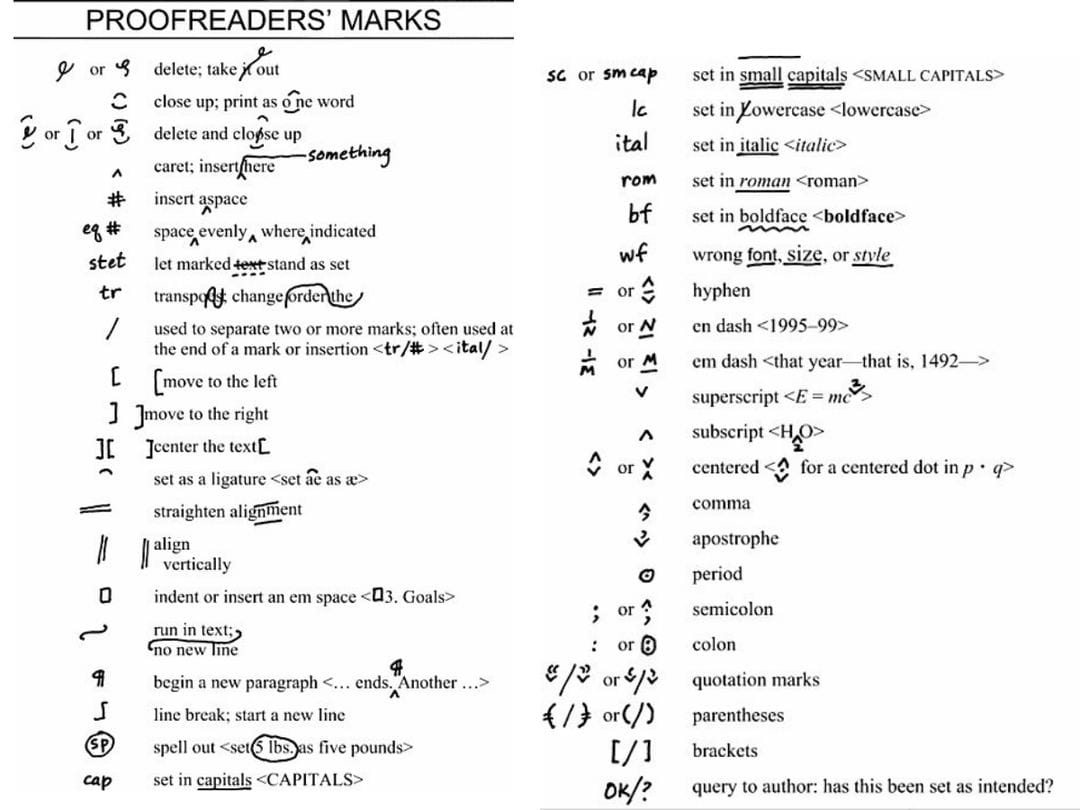
Proofreading marks serve as a common language between all parties involved in the creation of a book, and are intended to minimize confusion and mistakes.
How to use proofreading marks
Each change a copy editor or proofreader makes is noted in two ways. The first is on the text of the manuscript itself. This is where the proofreading symbols go: the wavy line for bold, the three underlines for capitalization, the hashtag for space. This is called in-line editing.
But simply marking up the text is not enough. To ensure complete clarity, copy editors and proofreaders always place corresponding notes in the margins of a book. Here, the correction is spelled out: bf for boldface, cap for capitalization, and so on. The notes in the margins are circled and separated by a slash.
Types of proofreading marks
Proofreading marks can be categorized in one of three ways: punctuation marks, operational marks, and typographical marks.
What are punctuation marks?
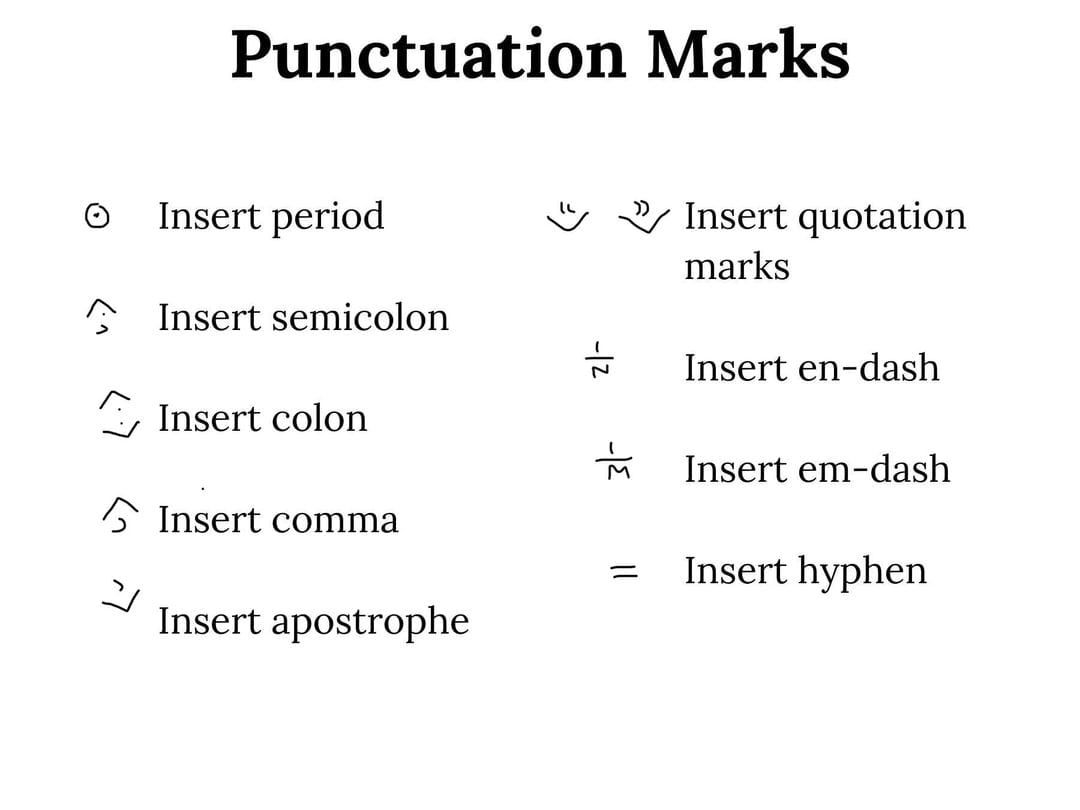
Punctuation marks are used to insert specific characters into the text like commas, apostrophes, dashes, colons, hyphens, etc. These are usually found inside what is called a caret, which is a fancy way of saying an arrow.
When an arrow is pointing up (˄), this means a piece of punctuation is being added to the bottom of the line. Examples are a period, a comma, or a semicolon.
When an arrow is pointing down (˅), this means a piece of punctuation is being added to the top of the line. Examples include an apostrophe or quotation marks.
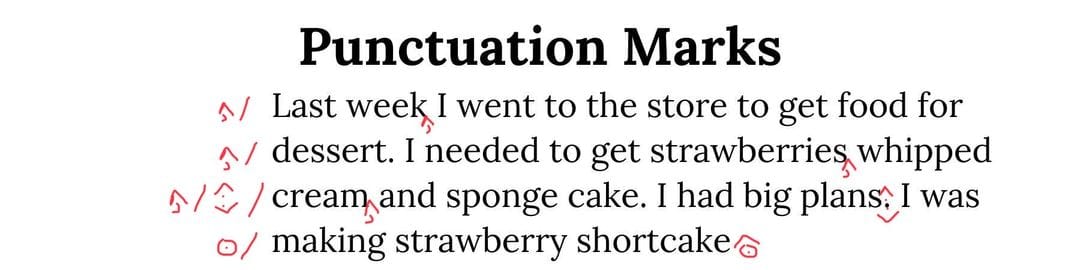
Below is an example of a page that has been edited to include punctuation marks.
What are operational marks?
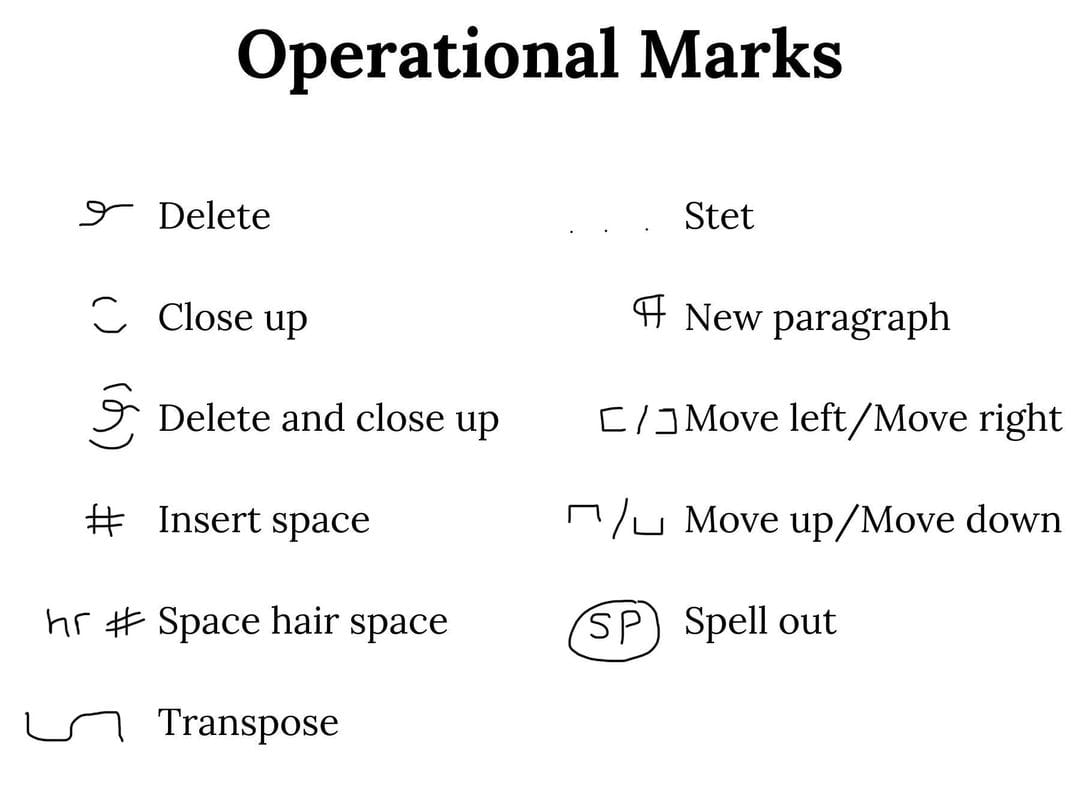
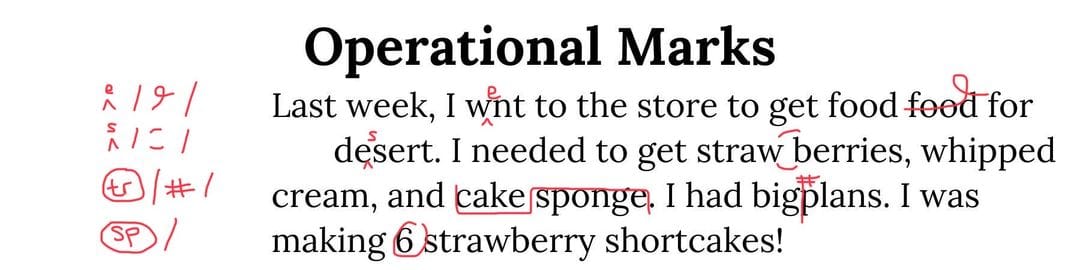
Operational marks focus primarily on the points where the text could function better. These marks correct issues such as sentence structure, spacing issues, and paragraph adjustments. The most common suggestions are the delete and new paragraph marks. Here’s a more clearly defined list of each operational mark and its meaning:
- Delete—Omit, or delete, a letter or word
- Close up—Delete a space between words or letters
- Delete and close up—Delete letter(s) and close up the space created by the deletion
- Insert space—Add a space between words or letters
- Space hair space—Add the narrowest type space possible between words or letters. This often appears between single and double quotation marks.
- Transpose—Change the order of letters, words, or sentences
- Stet—Also referred to as the “let it stand” mark, stet is an editor’s way of saying that a previously marked change can be disregarded.
- New paragraph—Begin a new paragraph where indicated
- Move left / Move right—In formatting, move a word or line to the left or right
- Move up / Move down—In formatting, move a word or line up or down
- Spell out—Spell out the full word. This frequently appears with numbers.
Below is an example of a page that has been edited to include operational marks.
What are typography marks?
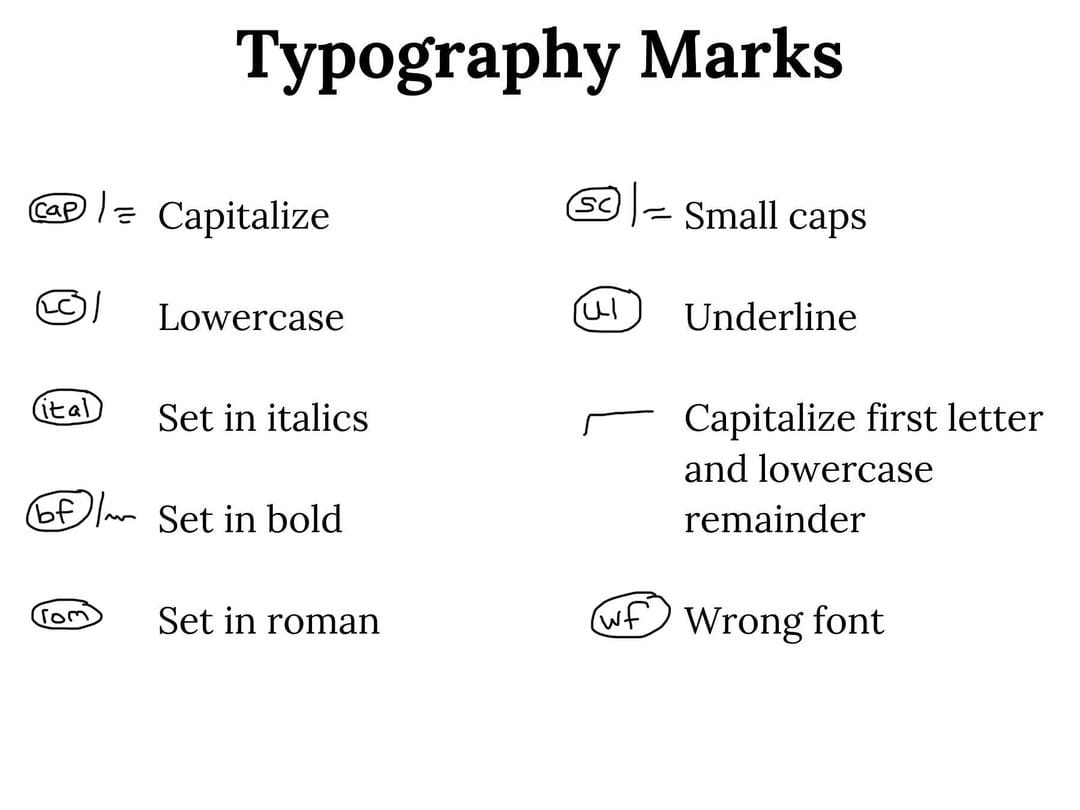
Typography marks focus on basic formatting and may include issues such as capitalization, underlining, or setting in italics or bold fonts. Here’s a more clearly defined list of each typographical mark and its meaning:
- Capitalize—Set a letter or word in all capitals
- Lowercase—Set a letter or a word in all lowercase
- Set in italics—Set a word in italic type
- Set in bold—Set a word in a boldface type
- Set in roman—Set a word in roman type
- Small caps—Set a letter or word in small capitals
- Underline—Underline a letter or word
- Capitalize and then lowercase—Capitalize the first letter and lowercase the remaining letters in a word
- Wrong font—Exchange a letter or word with the proper typeface to keep text uniform
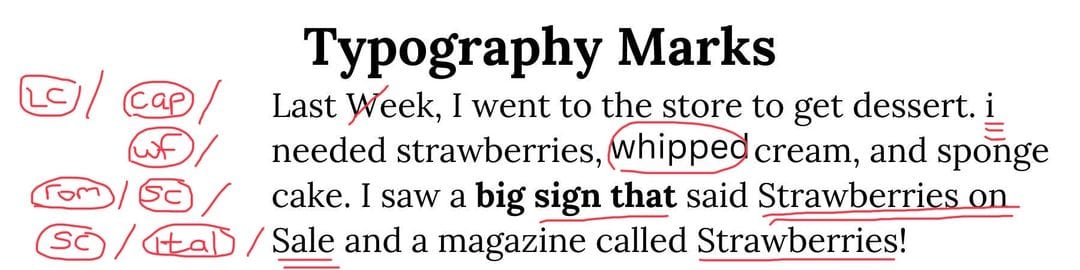
Below is an example of a page that has been edited to include operational marks.
Print versus digital proofreading
The truth is, the digital era has all but rendered proofreading marks obsolete. Most editors do their work on a computer screen, using tracked changes within programs such as Microsoft Word or Google Docs.
That being said, there are some old school copy editors and proofreaders out there who prefer pen and paper over a digital manuscript. Why? Because you can see mistakes better on a piece of paper than you can on a screen.
We are all used to rapid screen-reading. Glossing over words to just get the general gist of them. But copy editing and proofreading are not about glossing over anything. They are about looking at every little detail, and it’s far easier to focus on those little details when that red pencil is physically moving from word to word.
Beyond that, there have been numerous studies that show reading on paper leads to better overall comprehension and recall than screen-reading: two things you want in a copy editor or proofreader!
Pro Tip: Whether you work with a copy editor and proofreader or edit on your own, always print your book out and read it on paper before sending it to the printer. It’s a great way to find those last mistakes.